العربيةEnglish
One message. More understanding.01 / UNDERSTAND
Follow the message.
When you don’t speak the imam’s language, live translation helps you follow along as the khutbah is delivered.
Accurately translate khutbahs and other events live at your mosque. Join in your browser or download the Lumaat app to follow along in 50+ languages.
When the khutbah is in a language you don’t understand, you can be there and still miss its meaning. Lumaat helps you follow it live, keep the key lessons, and carry one small step into your week.
When you don’t speak the imam’s language, live translation helps you follow along as the khutbah is delivered.
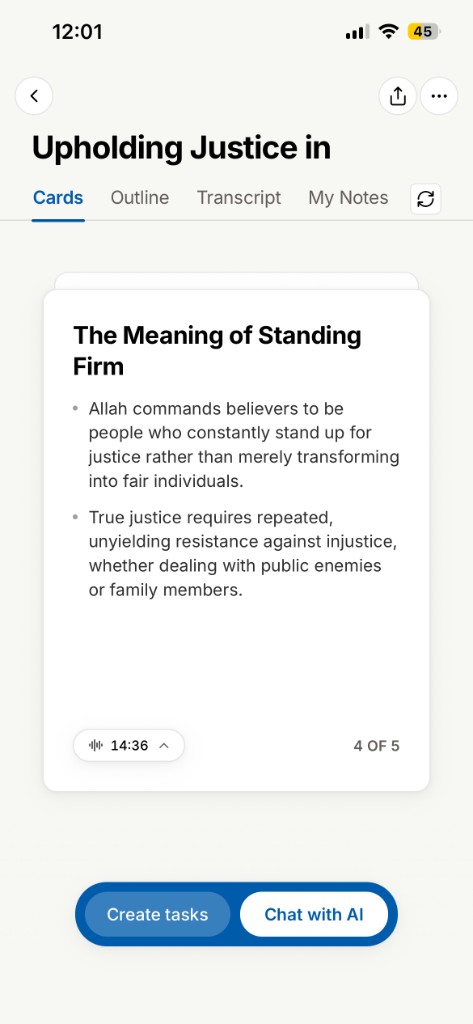
A beautiful khutbah can fade within a day or two. Start recording, set your phone aside, and focus on listening. Lumaat prepares your notes when the talk ends.
Turn what you heard into a simple habit, and carry the lesson with you through the week.
No one should feel left out of the khutbah because of the language they speak. With live translation in 50+ languages, more of your congregation can follow the message together.
Bring Lumaat to your mosqueLive Translation is optional. Turn it on while recording and Lumaat shows the spoken Arabic alongside an English translation, so you can follow the khutbah as it happens.
The English appears shortly after the imam speaks. Your recording continues the whole time, and you can turn Live Translation off again without ending the session.
Lumaat supports Live Translation across 50+ languages, so you can follow along even when the khutbah or talk isn't in your strongest language.
Language availability can vary by source and target language pair, and we'll continue expanding support over time.
It's built to help you follow the message, and it won't be perfect. AI transcription and translation can make mistakes, and accuracy depends on audio quality, echo, how far back you're sitting, how clearly the speaker talks, and specialised Arabic or Islamic terminology.
Treat it as help understanding the talk rather than a replacement for a qualified interpreter.
No. Live Translation needs an internet connection.
If it drops out, your recording keeps running, so you won't lose the talk.
Google Translate is a general-purpose translation tool. Lumaat is built around listening to Islamic talks.
Following along while the imam speaks is only half of it. When the talk ends, that same recording becomes a transcript, structured notes, Takeaways, and habits, kept in a personal archive you can search months later.
A translation helps you understand the khutbah in the moment. Lumaat is for keeping it afterwards.
Always ask the imam, speaker, or mosque for permission before recording or transcribing.
Mosque policies and local rules differ, so permission comes first. That isn't a call Lumaat can make for you. Once you have it, there are two ways to use Lumaat.
Start the recording and set your phone aside somewhere stable, such as face down on your lap. You don't need to watch the screen. Give the imam your attention and let Lumaat capture the talk.
Turn on Live Translation and read the translated text as the imam speaks. This does mean looking at your screen, but it lets you follow a khutbah you otherwise couldn't.
Either way, be mindful of the people around you and keep your phone use discreet.
Yes. Ask the imam, speaker, or mosque before you record or transcribe.
Different mosques have different policies, and some would rather talks weren't recorded at all. If you're asked not to record, please respect that.
Lumaat gives you the tool. It doesn't decide what's appropriate in your masjid.
No. Lumaat works for any Islamic talk you have permission to record:
Islamic lectures
Halaqas and classes
Reminders
Community talks
The aim is to help you understand, remember, revisit, and act on beneficial lessons, not only what you hear on Friday.
Not unless you want to use Live Translation.
If you're recording normally, start the session, place your phone somewhere stable, and focus on the khutbah while Lumaat listens in the background.
If you turn on Live Translation, the translation will appear on your screen so you can follow along as the imam speaks.
No. Lumaat needs to remain open on your screen while you're recording.
If you're not using Live Translation, you can simply hold your phone face down or place it somewhere stable and focus on listening. If you turn on Live Translation, you can keep the screen facing you and follow along as the khutbah is translated.
Lumaat keeps your screen from going to sleep while it's recording, so you don't need to touch it to stop it locking partway through.
For the best recording quality, sit reasonably close to the imam or speaker when possible, and keep your phone somewhere stable near you.
Keep your phone still. Movement and fabric rustling can affect recording quality.
Avoid placing it inside a bag, pocket, or under thick clothing.
If you're not using Live Translation, placing your phone face down on your lap works well.
Once the talk begins, try to leave your phone in the same position.
A clearer path between your phone and the speaker generally helps Lumaat capture the talk more clearly.
Not for recording. Lumaat can keep capturing the talk even if you don't have an internet connection.
Your transcript is written as the imam speaks, so a connection during the talk is what makes it complete. Short drops are fine. Lumaat reconnects on its own and marks anything it wasn't able to hear.
You'll then need internet when you're ready to process the recording and generate your notes. Live Translation also requires an active internet connection while you're using it.
The recording carries on. Losing signal doesn't end your session, and Lumaat resumes uploading where it left off once you're connected again.
If you were using Live Translation, the translated text may pause while you're offline and pick back up when the connection returns.
An incoming call takes the microphone away from Lumaat, so the session ends there. Lumaat tells you what happened and keeps the audio it already captured rather than discarding it, so the part of the talk you did record isn't lost.
Silencing your phone or turning on Do Not Disturb before the khutbah begins is the surest way to avoid it.
Losing internet is a different thing entirely. That doesn't interrupt your recording.
Up to 60 minutes in one session, which covers a khutbah comfortably.
Lumaat warns you as you approach the hour and saves the recording automatically when you reach it, so a talk that runs long never ends with a lost session. Time spent paused doesn't count toward it.
Storage is the least of it. An hour of audio is roughly 30 MB, and it's cleared from your phone once it's safely stored, so recordings don't pile up on your device.
Transcription works over the network while you record, so a long talk on mobile data rather than mosque Wi-Fi will use a noticeable amount of it. Recording itself continues either way.
Since Lumaat needs to stay open with the screen on, it's worth starting a long talk with a reasonable charge.
Lumaat turns the talk into notes worth returning to. You can read a session three ways:
Cards, the key points one at a time
Outline, the shape of the talk at a glance
Transcript, every word that was said
Lumaat begins processing your recording while you listen, so your notes are designed to be ready shortly after the talk ends.
Yes. Every session keeps its full transcript, and you can switch between Cards, Outline, and Transcript while reading a note.
AI-generated transcripts, notes, and translations can occasionally get things wrong. Take particular care where exact wording matters: Qur'anic verses, hadith, Arabic terminology, names, and anything that reads like a ruling.
Lumaat doesn't verify those references for you. When the precise wording matters, go back to the talk itself or to trusted Islamic sources.
Yes. Your talks build into a personal archive you can search and return to, so a khutbah that would normally fade within a few days stays available to you.
Yes. You can ask questions across the talks in your own archive, such as what your imam has said about sabr, and Lumaat answers from your notes.
Every answer points back to the note it came from, so you can check it yourself. Answers are drawn from what you've recorded, not from the wider internet.
Notes help you remember what you heard. Takeaways help you decide what to act on.
Lumaat draws out the practical actions a talk points to, so a lesson becomes something you can actually do this week.
A khutbah shouldn't have to end when you leave the masjid. Habits help you carry meaningful lessons into your week through small, practical actions.
It's a quiet place to work on something, not a scoreboard.
No. Lumaat suggests habits a talk points toward, but nothing joins your week unless you choose it.
Once your notes are ready you can open the suggestions from that talk, keep the ones worth acting on, and leave the rest. If a talk doesn't lead anywhere actionable, Lumaat says so rather than inventing something to fill the space.
Yes. You can start from a Takeaway or write your own habit from scratch.
Up to three at a time. The limit is deliberate. A few meaningful actions you'll genuinely keep are worth more than a long list you'll abandon by Wednesday.
Yes, whenever you need to. You can edit a habit, snooze it for a week, retire it, or remove it altogether, and retiring isn't final if you want to take it up again later.
Nothing holds you to a choice for a fixed stretch of time. If a habit isn't the right one for you this week, set it down and pick up another.
Your recordings and notes belong to your account. Nothing is published publicly, and nothing is sold or shared with advertisers.
Your data is encrypted on the way to us and while it's stored.
No. Nothing is shared automatically. Lumaat has no relationship with your masjid, and neither the imam nor the mosque receives your recordings or notes.
Sharing a note with someone is always a step you choose to take yourself.
Yes. You can delete an individual note, and you can clear any audio still waiting to be processed from Settings.
Not as a separate step today. Deleting a note removes the note itself, and the recording is cleared from your phone as soon as it's safely stored.
Finer control over audio and notes separately is something we're still working on.
Yes, from your Account page. Deleting your account removes your sessions, notes, Takeaways, and any pending audio.
Tell us a little about your mosque. We can bring a simple setup to your mosque, and it takes less than five minutes to get Lumaat ready for your khutbah.
We’ll be in touch about bringing Lumaat to your mosque.